Showing posts with label radio. Show all posts

Friday, September 22, 2017

WiFi danger demystified - scientific truth and practical solution


 Is WiFi dangerous?
 You can find so much information about how cancerous it is, but on my opinion, it's far to be logical and structurally substantiated and, almost no one proposes a practical solution.
In this article I'll try to simply explain the nature of radio-telecommunication using science and propose simple, but effective solutions.

First of all, what is WiFi? Many of you know that it's radio waves, thus electromagnetic emissions, which are caused by the induction phenomenon, transforming electronic current (electrons flow) into radio waves (electricity is tightly linked to magnetism) and vice-versa. Some of you might even know one of the most common frequencies of such radiation - 2.4 GHz (two billion four hundred million cycles per second), however, fewer knows about the frequency of the microwaves ovens, which is almost the same - 2.45 GHz.

 Let's deal with the microwave at first, why exactly this frequency? You see, the point of the microwave is to make food hot, especially water, and the frequency of its optimal dielectrical heat is exactly 2.45 GHz. Water molecules are polar matters, this means that they have an electrical charge (+ and -) from which depends their position in space, thus, producing a particular electromagnetic radiation will change their charge, molecules will move (change orientation) and from frequency (and wavelength) will depend their speed, and a fast molecule is a hot molecule. In brief, and omitting chemistry and physics details, that's how a microwave oven works.


Now about the WiFi. Why routers, designed for communication, use almost the same frequency that the microwave in the kitchen? Unfortunately, the science won't help much here, except maybe psychology because, the reason lies in legislation (and not conspiracy theory). The thing is that all the radio spectrum, as well as the ground, belongs to the state (government), and nobody has right for any radio emission without an authorization, this is one of the reasons for a quit height cost of mobile communication because, operators rent certain spectrum from the state. Nevertheless, there are frequencies (ISM band) that do not require an authorization and their usage isn't heavily restricted, besides, the antenna can be a simple wire (omnidirectional) with the length of 12.5 cm or 6.25 or even 3.125 (factor of the wavelength). Unfortunately, as history shows, legislation is more pointed towards business, rather than technology and health, especially in the USA, where many standards are adopted.

Turns out that we are all radiated by the microwave, and for the health this is not good since, we are practically boiling out brains ... For that reason, the WiFi signal is less strong while raining or in the forest (vegetation), because water absorbs a part of it. Nonetheless, the reality isn't so terrifying. The signal's power is limited and very far from the microwave's, without even counting the obstacles, the harm is pretty insignificant, but still is (like if there are 50 hot-spots and you're sensitive to EMF).

So, what to do? Change the standard? Wear foil hat? Disable WiFi? Once again, I'll try to propose a realistic solution. Everything is simple: switch the wireless router to 5 GHz frequency, this will not only reduce the harm greatly, but improve the speed as well, even if the distance will be at cost. And please, don't buy any kind of "100% EMF-proof protection talisman", at least if it's not a Faraday cage, as I have already proved, it's a scam. I mean there were some phone shielding, but modern smartphones aren't so radiating at all (by them self, see below for the network).


PC is, however, much more dangerous than a phone, but at a certain distance, waves lose their power and, well, such distance if fully provided by a chair, according to my measurements it's just few tens of centimeters, especially if you use ergonomics to your advance.
But even if you managed somehow to completely shield a PC, you should also do something with cables, like headphones because, they are quite powerful actually and since very close to the head, aren't completely safe, though it isn't still enough for a meaningfull damage.
Ethernet cable (aka RJ45) on the other hand is already shielded in many cases because, network engineers have figured out that by twisting pairs and putting foil will reduce the EMF and so the transmission corruption.
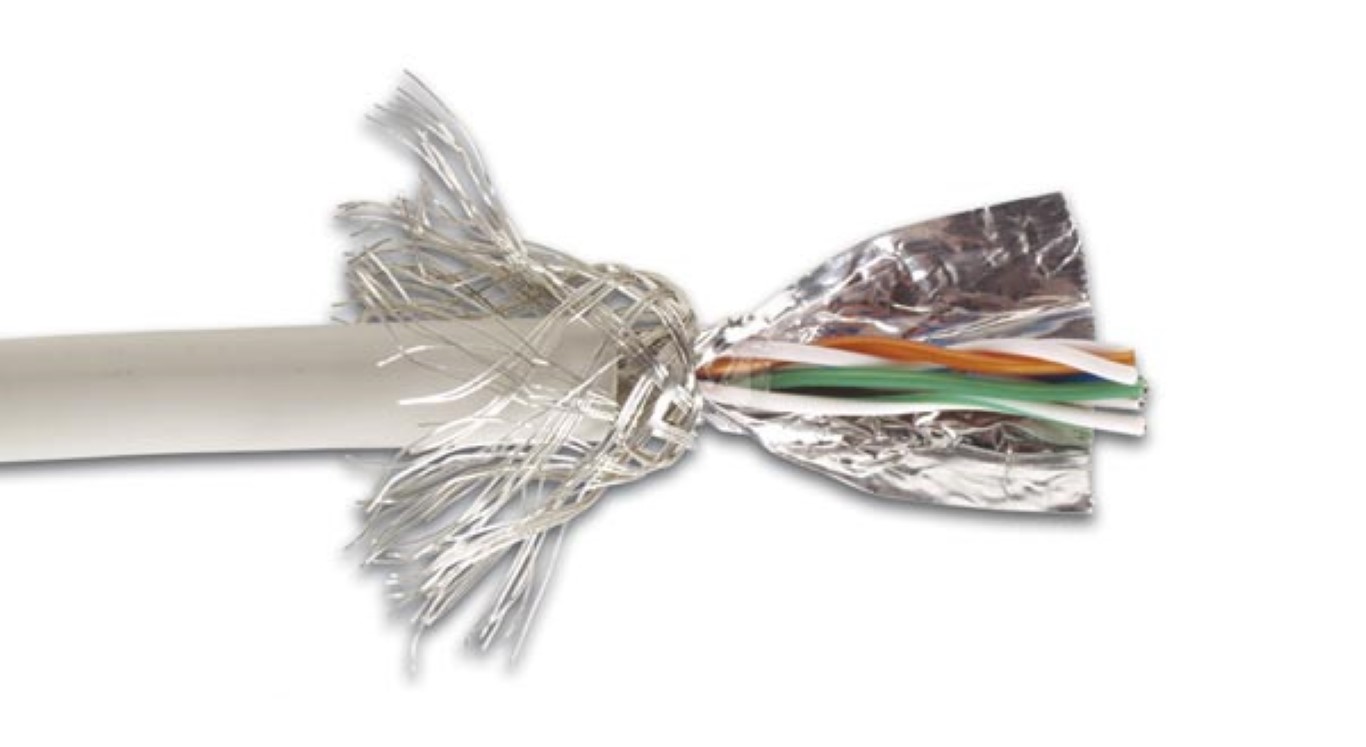


Anyway, don't forget that WiFi isn't the only one working in 2.4 GHz spectrum, Bluetooth for instance, also use it, and a microwave under the ear won't do any good (wireless headset), if of course isn't worn all day long, besides the strength (power) of Bluetooth (especially 4LE) is very weak, thus less harmful.
GSM/GPRS/3G/4G/5G work in different spectrum, although not so far from the microwave, the power is much more higher, as well as the potential harm (while speaking long time), so I'll advice to switch to 5G (12-60 GHz), after it will have at least some security and the operators will implement SDR.

Hope that this article was usefull to you and everyone else in the radius of several tens of meters.
Unless, you already have a "Faraday suit" :)


Tuesday, August 15, 2017

Practical WiFi hosts triangulation with Kismet, Python and Gimp for de-anonimization


NOTE - I created an independent project in order to automize some math

In this article, I'll try to explain how to (approximately) locate and identify any host on any WiFi hotspot, encrypted or not (link layer frames), using triangulation and some tools.

The purpose is to find an anonymous user who spoofed his MAC and consumes all the bandwidth by downloading Game of Thrones.

The exact mathematical therm is Trilateration actually.

So, let's say that we have a typical setup:


Many devices are connected to a single router, in fact, it also can be done with multiple bridges.

Our task is to estimate the location of a precise host (not only the router it-self), in order we can map it.

For now, we need to see the MAC addresses connected to specific AP (access point) and their RSSI in dBm (Received signal strength indication in decibel-milliWatts).

For that we can use WiFiChannelMonitor for Windows or (in our case) Kismet. One can try AirCrack-NG as well, but there are some tricks to add, like frequency channels, ACK/CTS/RTS frames and BSSID associations.

Just after launching Kismet, you should see a prompt for server starting, just press Tab (for navigation) and Enter (to select) Yes :


Name it like you want and Start :


Then, you will have to specify your network interface for promiscuous mode :


Just select your WiFi card or an already monitored interface (like mon0) :


Finally, just close the Console Window :


Now, you should have a pseudo-gui interface :


So, let's find a WiFi hotspot, by applying ESSID filtering (pressing Esc) and navigating using arrow keys :


Then just select (without Enter) the hotspot and you will see all the clients (MACs) connected to the network.
If you select it (Enter), you will see more details (I'm using 5GHz WiFi and not 2.4GHz like most of you) :


OK, let's see the details for the clients (by pressing Esc) :


Lastly, we will need to see their electromagnetic emission power (signal) level (basically, a decibel (power ration) for milliWatt (electricity consumption)), which is not displayed by default :


Now, we are ready :


Kismet will also show the manufacturer (based on MAC vendor) and you can sort them if you want.
Note that even if you return to main window, you will still see the power level :


OK, as you can see Kismet measured the power of my router (67 dBm) and of my smartphone (30), I'm using cable for my PC, so it's not displayed.
Based on such values, we can estimate the distance, but it will be better if we could calculate an approximation, what I did :


You just have to specify the AP frequency (displayed by Kismet as well) in MHz and the host power level (dBm).
The source code of the script can be found on my GitHub.
The formula that I used isn't the most precise (especially if you would make tests with different frequencies), but it's sufficent for our practical purpose.You can also, calculate logarithm with bc by the way, but I know that some of you are using Windows and not big fans of Cygwin, so I decided to make it as portable as possible, thus writing the code in Python.

So, now we know the distance, my smartphone is on my right (15 cm), so it's pretty easy to locate it in this case, but what about the router (10m)? Here's where triangulation (or trilateration) comes in place.

I'll use Gimp as a graphical editor, but you're free to use what you're more comfortable with (PhotoShop, Paint, etc).
So, let's make a square image of 500x500 pixels, which will correspond to 50x50 meters :


And make a circle with radius of 100 (10 meters), thus a diameter of 200, which is equivalent for a flat (not circle) surface of 200x200 (20 meters), or you can just enter 100x100 for simplification :


Just for better comprehension for the next part, let's color it as well :


Alright, we are at the center of the circle (my room), and the host can be anywhere on the end of the circle.
So, let's move like 5 meters backward (half of the radius) and measure the distance again.
From my kitchen, it will be 6.5 meters, so let's trace one more circle :


Now we can be sure that the host is located either few meters left, either few meters right.
If we decided to step forward or to the side, the distance will increase, but we will still have the two points of intersection.
So, let's make the final 3rd measurement stepping backward again and right few meters to my guest room, and measure 3.3 meters :


If we decided to step left, the distance would increase once again, but we will still have our unique intersection point (I just don't have that much place in my apartment).
OK, now we know almost the exact position, which was right lower corner from the beginning (my room) :

That's it for my router and since, Kismet will now display the power level of all clients, you can do the same for any connected host.
As you can see, it's quite simple and can be automize, but not easy to develop at large scales considering different antennas, obstacles, etc

I hope that you have learned something about WiFi, physics, radio and math.
Now if someone would say "it's anonymous to spoof MAC and connect to WiFI", you should have a smile and remember my article.